We’ve had some useful bug reports on our Discord Chat. One user reported a booting issue, but we have been unable to recreate this and nobody else has reported the issue so far.
Have you seen any issues with AppControl? Please tell us your AppControl version (top right cog icon, then choose “About”) along with your Windows OS version please. We can then investigate the bug and solve it.
I have an issue where the app hung at some point (it’s been a while - only just now trying to solve the problem) and I could not get it to restart. I uninstalled via the uninstaller and then reinstalled and now it opens to a blank white window - no visible chrome or controls or anything. I have tried Revo uninstaller to clear out the registry when uninstalling and then gone through my drives with a fine-toothed comb to search for any trace of it before reinstalling. I reinstall only to again get the blank screen.
Fully patched Windows running an XFX RX 7900XTX gpu and a 9800X3D cpu.
@devinbaines we are aware of this bug and our next update will have a fix. We are testing the update currently with the QA person.
For now, go to add/remove programs, uninstall AppControl, reboot (without rebooting the issue won’t be solved). Now reinstall AppControl. Did it solve it?
If not, our update will be out probably next week. I apologize for the problem.
I should have been clearer. Yes, I tried rebooting following an conventional uninstall and a conventional reinstall. That did not solve the issue. I then moved to Revo uninstaller to clear it out more thoroughly and that, too, did not work. Of note, in order to close the app I have to use the new “end task” functionality of the taskbar (right clicking on the app in the tasbar and choosing end task) since right clicking the app icon in the system tray and choosing exit does not close the white box (the app).
@devinbaines we will have a software update out next week that solves this. I apologize for the issue.
We may send out a pre-release test and if so I will mention you here and post it.
@devinbaines I posted out pre-release on our Discord. It should solve this issue before our final release in a day or so.
Or please message me privately here on the forum and I can respond with the link.
All is working great now thanks to the update. It must have updated itself since there was no user intervention from me and yet all is fine. Thanks!
1 Like
Hi AppControl Team,
Congrats on a great app.
I’d like to report some unusual behaviour - the App worked a few weeks ago when I installed it - can’t get it to run since.
It displays the animation, but it remains stuck.
From the Menu on the top-right not all options work - clicking on About does nothing.
Settings - not all options can be changed.
I could provide process dumps - should you DM me a link where I can securely upload them.
Cheers
Sorry for the issue. Can you confirm what version of our app you are using?
For the dumps… could you message me privately here (click my name) then .zip and attach them, but if they are too big just use the cloud service of your choice? Thanks.
Hi,
Thank you for your quick reply.
Was running Version 1.2 - I sent you the Dumps via transfer service.
Hope they provide useful info.
I just upgraded to 1.3.0.335b a few moments ago - works fine 
Cheers
1 Like
That’s good the update is working. I will see what we can find with the files, thanks!
It appears this is a bug we fixed in our latest version. Sorry for the issue, but now it appears it’s solved. If the issue happens again please let us know @visitor.
Thanks again for your report and dmp files!
Hi,
Glad to read you’ve already fixed the issue.
Also - glad to help
Cheers
1 Like
If anyone has found any other AppControl bugs please report here, or in our Discord. Thanks everyone!
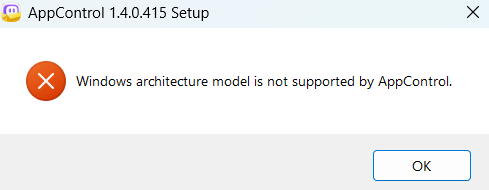
I’m currently unable to install AppControl due to the following error:
I had to put get approval for the executable from my org, but I’m not sure if this might be something you guys are familiar with? I’m using Windows 11 Enterprise 25H2.
1 Like
I have just installed 1.4.0.415 and its alerting (sending a desktop notification) every app has been updated - This is VERY annoying.
@appscontrolme sorry for the issue. Go to our “alerts” screen then drag the “app updated” alert to the “no notification” area.
We did not change anything, but we now detect updated apps in a different way that works better so these updates are real. We put in the change list that at first you’ll get a lot of these with this update, but then it will go back to normal.
We are investigating this issue, sorry for the problem.
@thedudemoongladepool please look at your private messages here and I sent an installer to test please.
I am using version 1.4.0.415. Just installed it yesterday after seeing it advertised on Linus Tech Tips. The app UI has hung on me several times. I have not been able to identify the cause or reproduce the issue myself. However, I still get notifications from AppControl while the UI is hung, e.g. “XXXXX.exe has run for the first time”. While it is hung I cannot access Activity, Apps, Alerts, Events, or settings and I see the white screen as others have mentioned. Ironically, I can use Task Manager to kill AppControl and then I am able to restart it from the start menu. I am running Windows 11 Enterprise, version 23H2 on a middle of the road laptop with Intel i7 CPU.
1 Like