I have been musing about this for some time and am actually not certain of its value.
I like being notified when a new program is launched, updated, etc., but if I go for that, things tend to be really noisy and that tempts me to turn off some notifications.
But there are some publishers I have come to trust and don’t feel I have to be notified for all the changes to their apps. An example might be Google Drive. It is updated frequently and I really don’t need to know when that happens.
I was thinking, if AppControl could allow me to specify I don’t want notifications for programs signed by specific publishers, it might make it easier for me to see those that are more likely to matter to me.
I have not fully thought this through. Something makes me think I have not thought of all the ramifications…
I wanted to add - if anyone can think of other benefits that can come from knowing and acting upon things based on who signed an executable, I would really like to hear!
I second this request. The ability to create a customized Trusted Publishers whitelist would help because it’s rather annoying to have recurring notifications for the same events (i.e. Microsoft Defender updates or Microsoft Edge updates), especially when the updating process of some apps involves different executables and AppControl creates multiple overlapping notifications which can possibly distract the user from what he is doing on the computer at that moment.
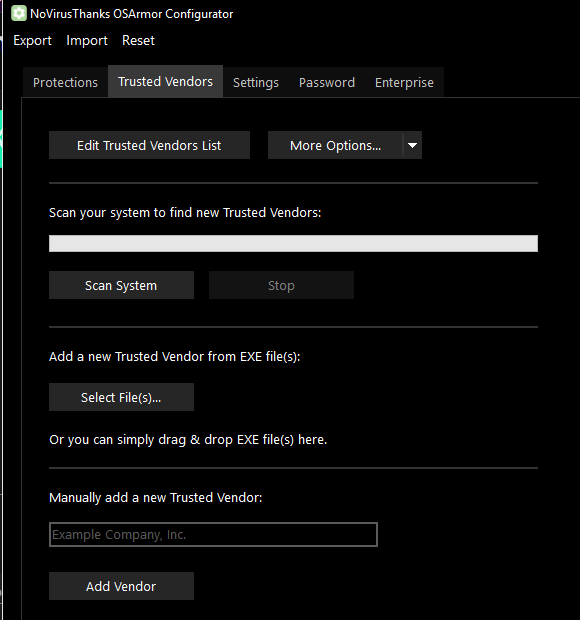
Regarding the addition of a Trusted Publisher to the whitelist, AppControl should include an option that allows you to select an executable file and, if this is digitally signed, add the author of the signature to the Trusted Publisher whitelist. In addition, you should be able to manually add a Trusted Publisher to the whitelist. Lastly, the whitelist should also be editable, so that the Trusted Publishers can be modified or removed if necessary. Just as an example, OSArmor, a cybersecurity software I use, has similar options to reduce or even not display its notifications when they involve digitally signed files.
I wouldn’t mind if it was at least a little difficult to add a certificate as “trusted”. I wouldn’t want it that I accidentally added a “Lets Encrypt” cert, for example.
In my not-so-humble opinion, Let’s Encrypt certs should only be trusted to ensure traffic is encrypted, not as any sort of assurance about identity.
In fact, it would be really nice if I tried to add a cert from Let’s Encrypt, that I would get a pop-up saying “Are you sure you want to add this certificate as trusted, knowing that the certificate authority does not provide assurance about the identity of the certificate holder.”
When it comes to trusting executables signed by a given certificate in AppControl, I am only concerned about identity.
Maybe this is why I started this thread by questioning my even asking for the feature!
I must admit I didn’t know the existence of “Let’s Encrypt” certificates which if I understand correctly, from what you write, would be less reliable when it comes to certifying the identity of the author. I’m no expert but it turns out that Digital signatures and Digital certificates are different thingsDigital Signature vs Digital Certificate: A Quick Guide - Hashed Out by The SSL Store™
If we are talking about executable files I think we have to refer to Digital signatures, not to Digital certificates but as I wrote above, I’m not expert or a programmer, so I could be wrong.
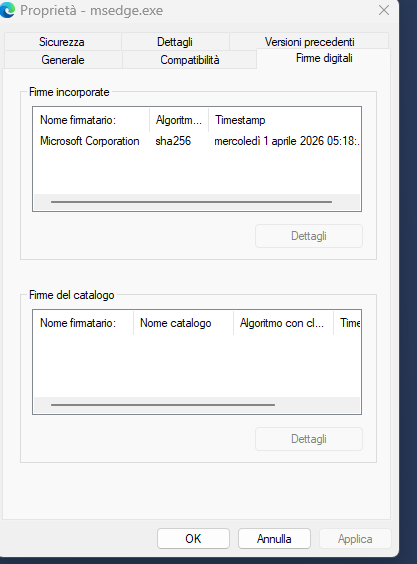
So, for example, if we wanted to exclude the executable file C:\Program Files (x86)\Microsoft\Edge\Application\msedge.exe from AppControl’s notifications, the latter should be able to identify the name of the signer, in this case "Microsoft Corporation” and automatically add it to the Trusted Publisher’s whitelist. This way all the executable files signed by “Microsoft Corporation” will be excluded from AppControl’s notifications, not only msedge.exe. AppControl already is able to identify the signer of a executable because it is shown in the notifications, I presume by reading the file’s properties so I think implementing a Trusted Publishers whitelist shouldn’t be a big deal.
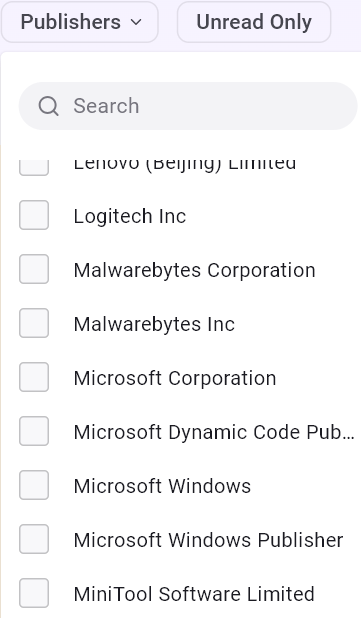
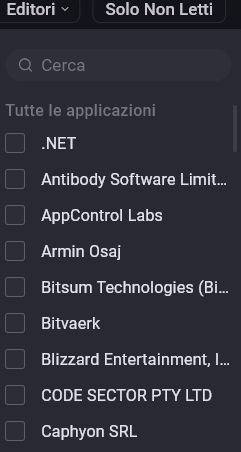
Thanks everyone for their feedback on ignoring some publishers. If you go to our “events” tab, then click “publishers” you can see that AppControl does keep track of all of them. Maybe it’s as easy as adding a setting that lists these and calling it “white list” or “ignore” or something?
That sounds like a possibility. But only if there is some way to validate the certificate.
Ideally, AppControl could offer a level of assurance, such as “AppControl has verified that the certificate used to sign these programs has been issued by CertAuthority to AppMaker and can be trusted”
Or maybe the ability to bring up the details of the certificate on the “Properties” dialog box for an executable.
I admit to not really understanding certificates.
As it is, I can see 4 in the list tied to “Microsoft…”
Is it possible for an imposter to get a certificate that is identified as “Micrsoft Windows” (missing “o”) and I accidentally trust them and never get alerts about them?
Is there any reason why I shouldn’t simply trust ANY executable that has been signed?
Would it be possible for AppControl to list the executables that have been seen using that certificate? It would give me a level of assurance if I check “Microsoft Corporation” in the above list and see many dozens of common executables. Contrast this to seeing “Micrsoft Windows” and seeing there is only a single executable on my computer signed with that certificate.
Am I being overly paranoid? Just because I am paranoid doesn’t mean they are not out to get me!
Is there any way for a program like AppControl to do anything that helps me to feel warm fuzzies that something is safe. Or conversely is probably more important - that something looks suspicious!
BTW - my concern over “Let’s Encrypt” certificates is totally wrong. “Let’s Encrypt” certificates can’t be used to sign code - they are strictly for use to encrypt data on websites. Sorry about that!
No. We already verify these certificates very carefully. You can also click the “path” of the file if you click the icon of an app we verified, then look its properties to confirm we are right about who signed it. This is kind of the basis of our whole application so if we could not verify a publisher correctly then that would make our software not very useful in my opinion.
These code signing certificates in Windows software are not like “Let’s Encrypt” certificates. These must go through a whole complicated proof and verification in order to get a code signing certificate. If a company that provides these gave a certificate out for Microsoft or Slack or someone it would be big news, and they would probably lose their license to give out more certificates in the future.
Sheesh! You would think I would try clicking on some things to see if more info is available.
I see that if I got to “Events” and click “Publisher” and then select a publisher, I get a whole bunch of info including programs signed by this “publisher”
So, I am thinking the ability to select a publisher and exclude from alerts anything signed by that publisher might be ideal.
I found an article that has more information on these types of code signing certificates and how they can be abused in some circumstances. “CA” means “Certificate Authority” who sells and assigns the certificates.
“Malicious use of digital certificates, whether by illicit purchases or stolen from the original owners, typically constitutes a four-alarm fire for a CA. According to the aforementioned CA/Browser Forum’s baseline requirements, a CA should revoke a certificate within 24 hours of obtaining evidence of misuse, and revocation must be completed within five days of obtaining the evidence.
CAs typically take swift action against mis-issued or stolen certificates used for malware code signing — even if it causes disruptions for genuine customers that rely on the certificate for business. Penalties for repeated mis-issuance or abuse issues can be severe; in 2017, Google announced that it would revoke trust for Symantec certificates after the cloud giant found more than 30,000 mis-issued certificates, which prompted the cybersecurity vendor to sell its PKI business to DigiCert later that year.”
I see. I think that right-clicking on a Publisher on that list should open a option to add that Publisher to the Trusted Publishers’ whitelist. After doing this the notifications related to that publisher shouldn’t be shown anymore. The whitelist should also allow to delete a previously added publisher, if needed.
Hello, is it possible to know approximately when / if this feature will be implemented ? Currently it is distracting, even annoying, to have recurring multiple notifications for the same, well-known softwares (i.e. Microsoft Defender updates, OneDrive updates, etc.)
I’ve just noticed that other users are asking for solutions to reduce the number of notifications so they are requesting similar features.
We are preparing a software update this week that won’t have a solution for this.
Our team looked at several options for hiding some notifications with our user interface, but we could not come to an agreement on how to make it work and look yet. We plan to come back to this for the next update and hopefully come to a decision on how it would look and work.