I installed it on two desktop PCs running Win10 Pro and Home within a few minutes of each other, both are on the same LAN. Each is running an app that rhymes with grass fire Elite. I’m describing as such due to Discource’s fondness for dumping posts having brand names into a mostly ignored waiting-on-approval bucket.
II’m perplexed by the disparity of WAN connectivity. Otherwise, my first questions are: Is the connectivity compulsory?
Thanks for your post about AppControl needing network connectivity. AppControl needs network connectivity for its insights (descriptions of what your executables do) and to check your executables if you use our suspicious app detection feature that’s optional, and off by default. We also check for AppControl software updates and alert you to them.
Our privacy policy has the details about this Privacy Policy - AppControl along with our optional “Software Privacy Mode” that has no connectivity, but misses out on some features.
Please note for that “Software Privacy Mode” someone found recently in the TechPowerUp forum that this mode has a bug if you install AppControl first not in this mode, then install AppControl a second time in this mode. To avoid this bug, go to add/remove programs and uninstall AppControl completely, then reboot, then reinstall using the instructions on our privacy policy page. Or, just wait for our next update that will come out next week probably.
If you use that mode you won’t be alerted to new updates and you’ll miss out on some important features, but we added that mode for people who might want to run the app in an environment that has no network connectivity, or environments that are sensitive for privacy.
Thanks. I’ll follow the TechPowerUp thread. There you note an announcement was made in the rhymes-with FrySmelter forum; it was Carl’s post 183 two weeks ago in the now at 201 post long “Major FruSmelter Announcement: keyboard encryption is dead, long live keyboard encryption” topic. (I was a SS15 beta tester.) No biggie, jusy sayin’.
My primary i9-9900K/Z360 PC is running Win10 Pro which is running FrySmelter 15 Pro. I will wait for the update and run the setup exe normally.
I’m of the thinking that blocking appcservice.exe in the firewall will provide the same outcome as the terminal /privacy install.
Let us know what you find. I don’t know because some firewalls can block local activity on your PC between the services and UI, so maybe it could cause a technical issue. “FruSmelter”
FruSmelter is a humorous typo indeed; shudda been FrySmelter. However, a closer rhymes-with could be SlySmelter. I do that due to Discourse’s fondness for dumping posts having formal software and people’s names into a mostly ignored waiting-on-approval bucket. I did post using the real name and that’s what happened so I re-posted. The same thing happens at their forum as well as the one for rhymes-with GrassFire firewall. Cheers.
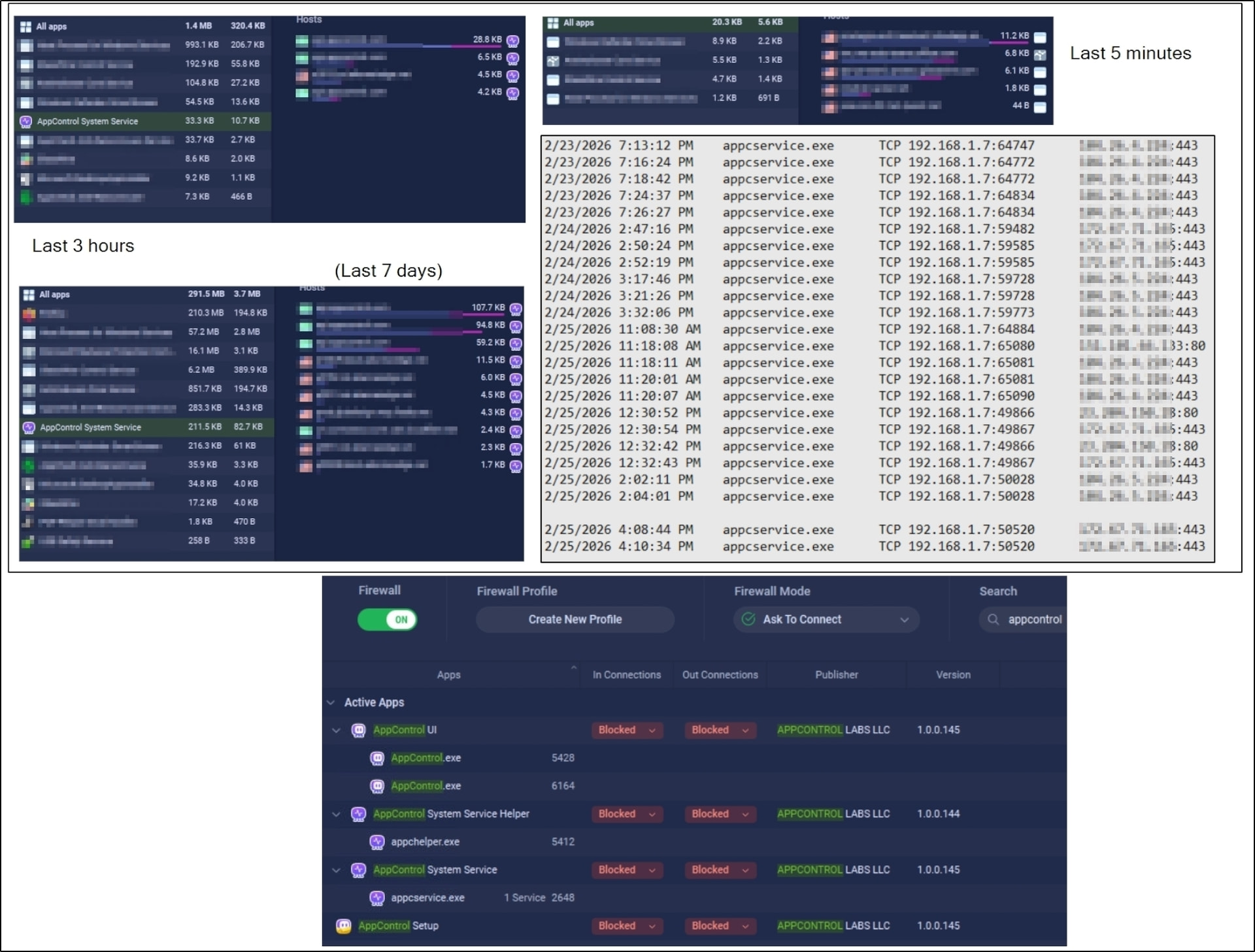
Comparing the last five minutes with the last three hours shows that the service is not on the WAN 100% of the time, apparently at idle. (The last seven days includes setup, FYI.)
At about 2:10 on 2/25 I blocked the apps found by a search on appcontrol in the firewall app as seen in lower image.
I spent about an hour opening new apps, a good number unsigned (in between surfing the web, email, RSS), all of which rendered in the Events panel.
At 4:08 I allowed the apps and the AppControl System Service immediately went back on WAN. Certainly this would be the expected behavior if one’s ISP internet was lost and regained or a mobile laptop went out of and back in range of access points.
As seen in that capture of my network log txt file (0.0.0.0 & 127.0.0.1 ignored), there was no connectivity during that period. I added that line feed for clarity.
I have observed as well and so far if New Suspicious App is under Notify me OR No notifications, a new app launch will wake up AppControl System Service’s WAN connectivity.
While those described as extremely privacy conscious might prefer the permanence of the AppControlSetup.exe /privacy install, I believe I’ve demonstrated using a firewall is an option one can use running AppControl under a standard install, and to allow or block at will for system/network troubleshooting or a temporary lock out for some other purpose. Experience required, of course; another way of saying, “Not for everyone.”
Yes, if you want us to check for software updates, show you “insights” on what processes are, and to check for potential bad apps then AppControl will always need connectivity.
Our optional privacy mode is always available Privacy Policy - AppControl , but I personally only recommend it for computers that will rarely or never be connected to the network at all because you miss out on a lot of useful functionality.
The other issue from that mode is that you need to check for AppControl software updates manually by going to AppControl.com or you’ll never know about them.